


HubbleClub By Hubble Connected
3.91.59K Reviews
App Specs
- Version
- 1.01.64
- Updated On
- License
- Free
- Downloads
- 100,000+
- Developer
- Hubble Connected
- Categories
- Parenting
- Platform
- Android, iOS
Screenshots
 Analysis by AppCompare
When a new baby-monitoring app is installed, the first few days can feel reassuring simply because there is more to check from a phone. The harder question is whether it remains useful once that novelty wears off. HubbleClub By Hubble Connected has a more lasting case when its monitoring, sleep tracking and parenting content become part of a routine, rather than another screen a tired parent feels obliged to open.
What it is—and what it is not
Hubble Connected makes this free parenting app for people who want a place to follow a little one’s monitoring and sleep information alongside parenting material. Its overall rating is 3.9 from around 6,200 ratings, with about 1,500 written reviews and over 100,000 installs. Those figures suggest an established audience, but they do not tell me whether its particular tools fit your home; that depends on what you want to check and how often you will use them.
I would think of it as a companion to the Hubble-connected setup you already use, not as a stand-alone answer to every nursery or home-monitoring need. That distinction matters before downloading: an app can only help with the routines and equipment it is designed to support. If you are still choosing a monitor, compare the complete device and service you would rely on, rather than assuming that the app alone will provide a camera view.
The first-week appeal
In the first week, the draw is simple: the phone gives parents a convenient way to check in, and sleep tracking can make an otherwise blurry stretch of nights feel easier to review. Parenting content adds something to browse when you have a question or a quiet moment. For a new parent, putting these jobs together can feel more manageable than jumping between a monitor interface and unrelated reading.
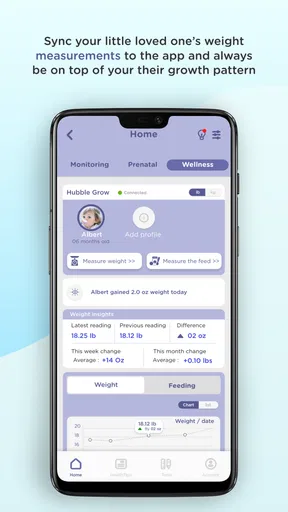
A realistic use is checking the nursery while one parent steps into another room to prepare a bottle, then looking back at the sleep record later instead of trying to remember every wake-up. That does not turn an app into a substitute for attentive care, and a record is most useful when it helps you notice a routine—not when it creates pressure to measure every moment. I would use the information as a prompt for conversation and observation, not as a diagnosis or a promise that a particular sleep pattern is normal.
How the value changes over time
The month-to-month value depends less on how many times you open the app in a day and more on whether it continues to answer a practical question. A family may find the monitoring useful whenever a caregiver is in another part of the home, while sleep tracking may matter most during periods when schedules are changing. Parenting content has a different rhythm: it is useful when it meets a current concern, but it need not become a daily reading assignment.
For shared caregiving, I would agree on a simple routine before relying on the app: decide who checks in, when the sleep record is reviewed, and which observations are worth passing along. That avoids turning the phone into a running commentary between adults. It also makes the app easier to judge after the first burst of interest. If it saves a repeated trip to the nursery or helps you recall a pattern you would otherwise forget, it has a clear job; if you rarely consult those tools, you may not need to keep building habits around them.
Worth Reading Before You Choose

EA SPORTS FC Mobile 26 Is a Bigger Football Game, but It Takes Time

Flipboard Shows What News Apps Must Do Beyond the Feed

Switching to Android Auto Means Rethinking Your Driving Routine

Google Calendar Makes a Crowded Week Easier to Manage

Ludo King Makes the Most of the Minutes Between Plans

Baby Panda World Brings Quick Play to Modern Phones, but Its Game Library Feels Busy
Maintenance, costs and practical trade-offs
The app is free to download, but in-app purchases range from $1.99 to $149.99 per item. I would treat that wide span as a reason to check what a particular purchase covers before paying, rather than assuming that every useful tool requires an upgrade or that one purchase unlocks everything. Start with the functions you can use without paying, then decide whether a specific limitation is getting in the way often enough to justify spending.
Maintenance is partly a matter of keeping the phone, the app and any connected equipment ready when you actually need to check in. A practical habit is to test the setup at a calm time, confirm that you can reach the view or information you expect, and avoid waiting until bedtime to discover that something needs attention. If several adults share caregiving, make sure each person understands the same routine; confusion about who is monitoring can undermine the convenience of having a phone-based tool.
The app is rated for Everyone, runs on Android 5.0 or later, and its current version is 1.01.54. It was released on May 4, 2021. Those details help with basic compatibility, but I would still consider the age and capabilities of the phone you plan to use. A device that struggles with other everyday apps may not make a reassuring companion for video or monitoring, especially when you need a quick check rather than a patient wait.
Where fatigue can set in
Any monitoring tool can encourage too many checks. If looking at the phone every few minutes makes you more anxious rather than more informed, the app is not improving the routine at that moment. I would set a clear purpose for opening it—checking in while away from the room, for example—and leave the rest of the day to ordinary caregiving. Sleep information can also feel like pressure if a parent treats every uneven night as a problem to solve, so it helps to keep the record in perspective.
There is also a trade-off between convenience and dependence on a connected setup. A phone app may be easier than walking back to a separate monitor, but that convenience is only useful when your connection and equipment are behaving as expected. If reliable local viewing is your priority, compare HubbleClub with a dedicated monitor that suits that need instead of assuming an app-based workflow will be the best fit. And if you want a broad, independent sleep diary rather than a Hubble-centered experience, a simple notes routine or a separate tracker may be a better match.
Who is most likely to keep using it?
I can see this working best for caregivers who already use compatible Hubble equipment and want monitoring and parenting resources close at hand. It is also a reasonable option for parents who like reviewing sleep patterns but can do so without treating them as a scorecard. Families with more than one caregiver may appreciate having a shared point of reference, provided they agree on how to use it and do not mistake app activity for a substitute for direct communication.
I would be more cautious if you have not settled on monitoring hardware, prefer to keep parenting information separate from device tools, or know that frequent notifications will make you check your phone compulsively. It may also be a poor fit if your household needs a very specific monitoring workflow that the connected equipment does not support. In those cases, choosing the camera or monitor first—and then picking the software that fits it—is more sensible than starting with an app name.
Living with HubbleClub
HubbleClub is a parenting app by Hubble Connected, and its promise is most convincing when the tools fit a repeatable household routine. For a new user, the first-week appeal is the convenience of checking in and having sleep-related information nearby. Over time, the more useful test is whether those features still save effort or help you make sense of a routine without adding another obligation to an already busy day.
Getting Started with HubbleClub
First things first, downloading and installing the HubbleClub By Hubble Connected app is a breeze. Available on both Android and iOS, it’s as simple as heading over to your app store, hitting download, and you’re on your way. The app itself is free, but be prepared for some in-app purchases if you’re looking to unlock all the bells and whistles.
Setting Up Your Devices
Once you’ve got the app up and running, the next step is to connect your devices. Whether you’re using a baby monitor, a home security camera, or any other compatible Hubble device, the setup is straightforward. The app guides you through each step, and before you know it, you’re peering into your living room from the palm of your hand.
One of the coolest features here is the ability to integrate with a wide range of devices. This flexibility means that as long as your gadget is Hubble Connected, you’re good to go. Plus, the app supports multiple devices, so you can keep tabs on different rooms or areas simultaneously.
Features That Stand Out
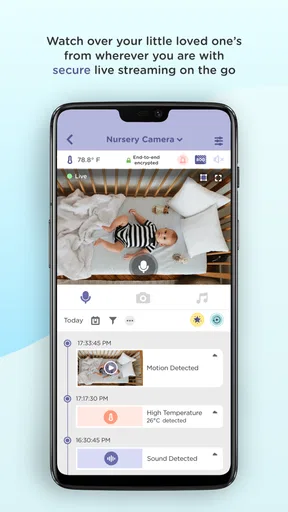
The app’s interface is clean and intuitive, which is always a plus. You don’t want to be fumbling around trying to figure out how to switch between camera views when you’re supposed to be watching the baby sleep. The video quality is impressive. You get a clear, crisp view whether it’s day or night, thanks to the night vision feature.
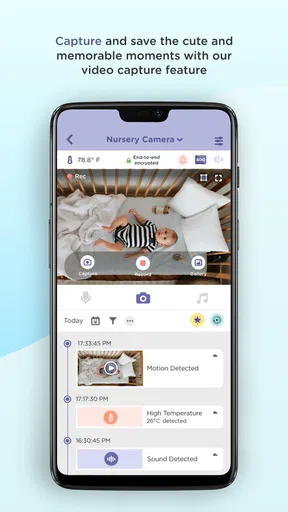
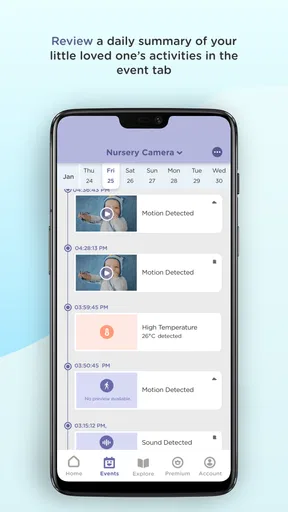
Another highlight is the motion and sound detection alerts. These notifications pop up right on your phone, so you’re always in the loop if something’s amiss. And if you’re like me and love sharing cute baby moments, you’ll appreciate the ability to record videos and snap photos directly from the app.
Interactive and Engaging
One feature that really sets HubbleClub apart is its interactivity. You can talk through the app via the two-way audio feature, which is perfect for calming a restless child or even deterring a potential intruder. This adds a layer of interaction that’s both practical and reassuring.
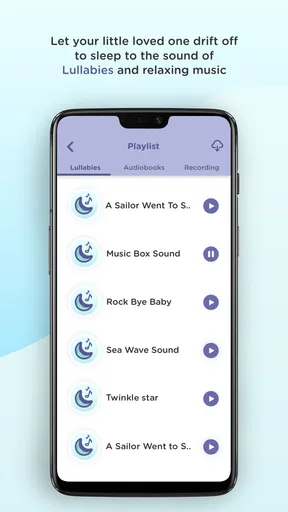
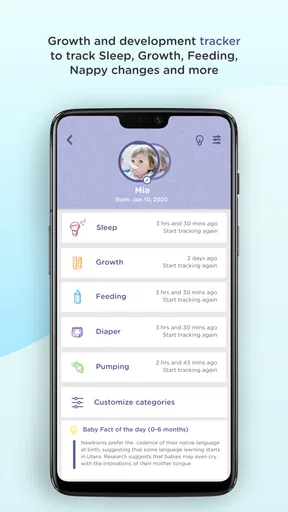
For parents, the app offers some extra goodies. Think sleep tracking and parenting tips that could come in handy, especially during those early months. It’s like having a little parenting assistant right in your pocket.
Room for Improvement?
Of course, no app is perfect, and HubbleClub is no exception. While the free version offers a lot, some of the more advanced features are locked behind a paywall. If you’re looking for extensive storage or enhanced monitoring capabilities, you might need to spring for a subscription.
Additionally, there are moments when the app can lag, especially if you’re trying to stream video on a slower network connection. But, hey, these are minor hiccups in an otherwise smooth experience.
Final Thoughts
All in all, HubbleClub is a solid choice for anyone looking to add a layer of connectivity and security to their home or nursery. The app is user-friendly, packed with features, and offers a decent amount of free content to get you started.
Whether you’re a tech-savvy parent or someone just dipping their toes into the world of smart home devices, this app is worth a try. It’s like having a piece of mind right on your smartphone, and who wouldn’t want that?
So, if you’re in the market for a handy app that blends convenience with a touch of innovation, give HubbleClub a whirl. You might just wonder how you ever lived without it.
Pros
- User-friendly interface for easy navigation.
- High-quality video streaming and playback.
- Seamless integration with smart devices.
- Customizable alerts for personalized notifications.
- Secure cloud storage for video history.
Cons
- Limited free features; premium needed.
- Occasional connectivity issues reported.
- Some features require strong Wi-Fi.
- Notifications can be delayed at times.
- App updates can be slow to roll out.
FAQs for HubbleClub By Hubble Connected
What is HubbleClub by Hubble Connected?
HubbleClub by Hubble Connected is a comprehensive app designed to work with Hubble Connected devices, providing features like live video streaming, motion detection, and customized alerts. It integrates seamlessly with smart home systems, enabling users to monitor their home environment remotely and keep an eye on loved ones for enhanced security and peace of mind.
Is HubbleClub compatible with all smart devices?
HubbleClub is compatible with a range of Hubble Connected devices, including baby monitors, home cameras, and environmental sensors. While it supports many Android and iOS devices, it’s always a good idea to check the specific device compatibility on the app's official page or within your app store to ensure seamless integration.
Does HubbleClub require a subscription?
While the HubbleClub app is free to download and offers basic functionalities, some advanced features, like cloud storage for video recordings and enhanced monitoring options, may require a subscription. Users should review the app’s pricing details to understand which features are included in the free version and which require a premium subscription.
How secure is the data on HubbleClub?
HubbleClub prioritizes user security and employs encryption protocols to protect data. The app ensures secure transmission of live video and personal data. Users should regularly update their app to the latest version to benefit from the latest security enhancements and follow best practices for secure password management.
Can I access HubbleClub from multiple devices?
Yes, HubbleClub allows users to access their account from multiple devices, providing flexibility in monitoring the connected devices. This feature is particularly useful for families or households where multiple users need access. Ensure each device is compatible and securely logged in to maintain data privacy and security.


